Hey there, fellow welding robot operators and team leads! If you’re reading this, chances are you’ve hit a snag with your welding robot at one point or another. I’ve been in this game for over a decade—first as a field technician fixing welding robots out on shop floors, and now as part of the team supporting a welding robot supplier that works with small fabrication shops and large automotive plants alike. Let me tell you: 9 times out of 10, common issues aren’t that complicated to fix. You just need to know where to start troubleshooting, and not panic when the robot suddenly stops mid-weld or spits out uneven beads. Welding Robot
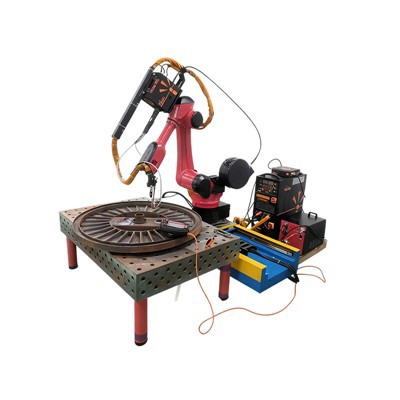
I’ve seen everything from a loose cable that shut down an entire production line to a clogged gun that ruined a $1,500 steel panel. The good news? Most of these problems are things you can check on your own, without calling for emergency support at 7 a.m. In this post, I’m walking through the most common welding robot problems I see every day, step-by-step fixes, and a few pro tips I’ve picked up along the way. By the end, you’ll feel way more confident keeping your robot running smoothly.
Let’s start with the big one: robot movement errors or unexpected stops. This is hands down the issue that gets tech calls the most. A welder will be in the middle of a job, hit “run,” and the robot just freezes, flashes an error code like E-stop triggered or axis overcurrent, and nothing happens. First, let’s rule out the obvious stuff. I know it sounds silly, but check the physical E-stop buttons—both on the teach pendant and the robot’s control cabinet. I can’t tell you how many times I’ve walked into a shop and seen an E-stop that was tripped when a part of the production cart knocked into it, or a team member bumped it reaching for a wire spool. If that’s not the case, check the emergency stop circuit breaker. Sometimes, a power surge mid-weld will trip it, and it’s hidden in the back of the control cabinet—easy to miss.
If those are fine, next move to the axis motors and cables. Welding is a tough environment—dust, spatter, and heat eat away at wiring over time. I’ve seen a motor cable on a 6-axis robot fray so bad that one loose wire made the robot’s arm jerk off course. To check this, go to your robot’s teach pendant menu, pull up the axis status screen. It’ll show real-time current draw for each axis. If one axis is spiking way higher than the others, that’s a sign the cable is damaged or the motor is dirty. Also, don’t forget about joint lubrication. Most welding robot manufacturers recommend re-lubricating the joints every 500 to 1,000 hours of operation. Shop grime can dry out the grease, making the motor work harder, triggering overcurrent errors. I once worked with a medium-sized job shop that skipped lubrication for 2 years—their robot started throwing axis errors every other day, and a full joint service fixed it for less than $300.
Next up: uneven, inconsistent weld beads. This is another daily headache. You’ll run a test weld, and one side has too much heat, the other is too thin, or there’s spatter all over the base metal. When this happens, most people jump to replacing the wire feed or changing the gas— but let’s start simpler. First, check the torch tip and contact tip. Spatter builds up on these like crazy, and even a thin layer will disrupt the gas flow and the arc. I always tell operators to clean their contact tip with a wire brush or tip cleaner after every 4 to 5 welds, not just at the end of the shift. If the tip is worn down—like the hole is elongated instead of round—replace it. A worn contact tip can cause the wire to wobble as it feeds, leading to uneven beads.
Then there’s the gas flow. A lot of operators forget to check their argon or CO2 gas regulator. If the flow rate is too low, air gets into the weld pool, causing porosity and weak beads. If it’s too high, it blows the gas away, leading to spatter. The ideal flow rate for most steel welding is 15 to 25 cubic feet per hour, and for aluminum it’s 20 to 30. Do a quick check: run a test weld, hold a piece of white paper 1 inch away from the torch. If there’s a steady, even stream of gas pushing the paper back without any turbulence, your flow is good. Also, check the gas hose for leaks. Over time, the hose can crack at the connections, soapy water on the fittings will bubble if there’s a leak. That’s an easy fix—just tighten the connection or replace the hose.
Wire feeding issues are another big category. The wire feed motor is working non-stop, pulling the welding wire from the spool to the torch. If the wire sticks or feeds erratically, you’ll get incomplete welds or burn-backs. First, check the wire spool. Is it loaded correctly? Sometimes operators put the spool on backwards, which twists the wire as it feeds. Make sure the wire is coming off the top of the spool and feeding into the wire liner. Next, check the liner inside the torch. If there’s a buildup of dust, spatter, or old welding wire residue, it can block the liner. I’ve seen liners so clogged that the wire wouldn’t feed at all. To clean it, disconnect the liner from the torch and the feed unit, blow compressed air through it, or use a wire specifically designed to pull out debris. If the liner is bent or worn, replace it—this is a part that should be changed every 6 to 12 months, depending on how often you use the robot.
Another thing: the wire feed tension. Most feed units have two adjustment knobs. If the tension is too loose, the wire will slip and feed unevenly. If it’s too tight, it can kink the wire, leading to feed errors. A good way to test this: run a 6-inch length of wire. If it pulls smoothly without slipping or kinking, you’re golden. If not, tweak the tension a quarter turn at a time until it’s right.
Now, let’s talk about something that’s often overlooked but causes so many issues: calibration. Welding robots need to be calibrated regularly to make sure they’re hitting the exact right spot on the part. Most shops only calibrate when they install the robot, and then forget about it for years. But parts can shift, the robot’s arm can get knocked out of alignment if a heavy part is dropped near it, or the tool center point (TCP) can drift. The TCP is the point at the end of the torch that actually deposits the weld. If that’s off by even a millimeter, your weld bead will be in the wrong place. How do you check and calibrate TCP? Every teach pendant has a calibration routine— it only takes 10 to 15 minutes. I recommend calibrating TCP after any routine maintenance, after moving the robot, or every 3 months if you use it 8 hours a day. It’s one of the fastest fixes for inconsistent welds that I know of.
Wait, let’s not forget about the control system. Sometimes the robot isn’t the problem—it’s the programming or the parameters loaded into the controller. If you get an error about parameter mismatch, or the weld parameters aren’t matching what you set, go into the program menu and check that the correct parameters (like voltage, amperage, travel speed) are loaded for the current part. I’ve seen new operators accidentally load the wrong program for a thick steel part onto a thin aluminum job, leading to terrible welds and spatter. Also, keep your robot’s firmware up to date. Manufacturers release updates regularly that fix bugs in the control system, improve movement accuracy, and prevent error codes. Most modern robots have a way to download updates via a USB drive, so it’s a simple process that takes 30 minutes, and it can avoid a lot of issues down the line.
Before I wrap up, let me leave you with a few pro tips that I’ve passed on to every operator I’ve worked with. First, keep a maintenance log. Jot down when you clean the tips, calibrate the TCP, lubricate the joints, or replace parts. That way, you can spot trends—like if you’re replacing contact tips every 2 weeks, that might mean you’re welding with too much current and burning them out. Second, train your team properly. A lot of issues come from new operators who don’t know how to do basic checks. Our team offers free 2-hour refreshers for all the clients we sell robots to, because we know that even the best robot won’t run well if the person using it doesn’t know how to maintain it. Third, don’t ignore small issues. If the robot is making a funny noise or the bead is slightly off for a few days, fix it right away. Small problems turn into big, expensive repairs if you let them fester.
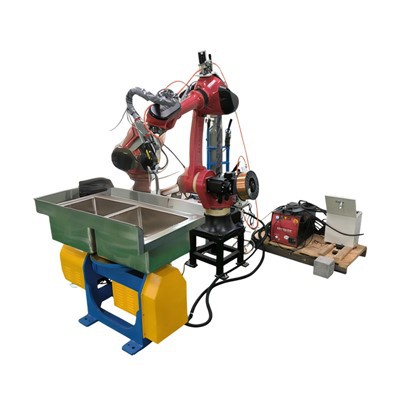
At the end of the day, welding robots are durable machines, but they’re only as good as the care you put into them. The most common problems are not major—they’re just small things that get overlooked: a loose E-stop, a clogged tip, an uncalibrated TCP. I’ve had clients come to us panicking because their robot is down, and 10 minutes of troubleshooting fixes everything. We love helping our clients, but we also want them to feel confident that they can handle most issues on their own. If you’re dealing with a problem that you can’t solve, or you want to talk about upgrading your robot setup to make troubleshooting even easier, we’re here to help. Our team has experience with all types of welding robots, and we can walk you through step-by-step to get your production back up and running. Don’t hesitate to reach out to discuss your needs—we’re ready to help you keep your welding line running smoothly.
Industrial Robots References
- Welding Robot Maintenance Handbook, International Institute of Welding, 2022
- Troubleshooting Guide for Industrial Welding Robots, Robotic Industries Association, 2021
- Common Welding Robot Error Codes and Fixes, Modern Metal Fabrication Magazine, 2023
- TCP Calibration Best Practices for 6-Axis Welding Robots, Journal of Robotic Welding, 2020
Dongguan Chuanglida Intelligent Equipments Co., Ltd.
As one of the most professional welding robot manufacturers and suppliers in China, we also support customized service. Please feel free to buy discount welding robot in stock here from our factory. For price consultation, contact us.
Address: Room 201, Building 2, No. 61, Shachang 1st Road, Dalang Town, Dongguan City, Guangdong Province
E-mail: haoguangli001@outlook.com
WebSite: https://www.boruntestech.com/
